Looking for an alternative or complement to Notion?Meet Wikimee!

Productivity platform dedicated to producing and publishing content.

A productivity and note-taking app.
Understand what each tool does
Do you need a platform that adapts to your workflow? Wikimee is for you.
It creates relationship portals to manage demands, projects, campaigns and automations, running the workflows, content management, approval, collaboration and sharing, all in one platform.
Notion is an all-in-one notes, project and collaboration tool that lets users create customizable workspaces. Widely used by remote teams, it brings documentation, project planning and databases together in one place, known for its intuitive and flexible interface.
The 5 pillars of productivity
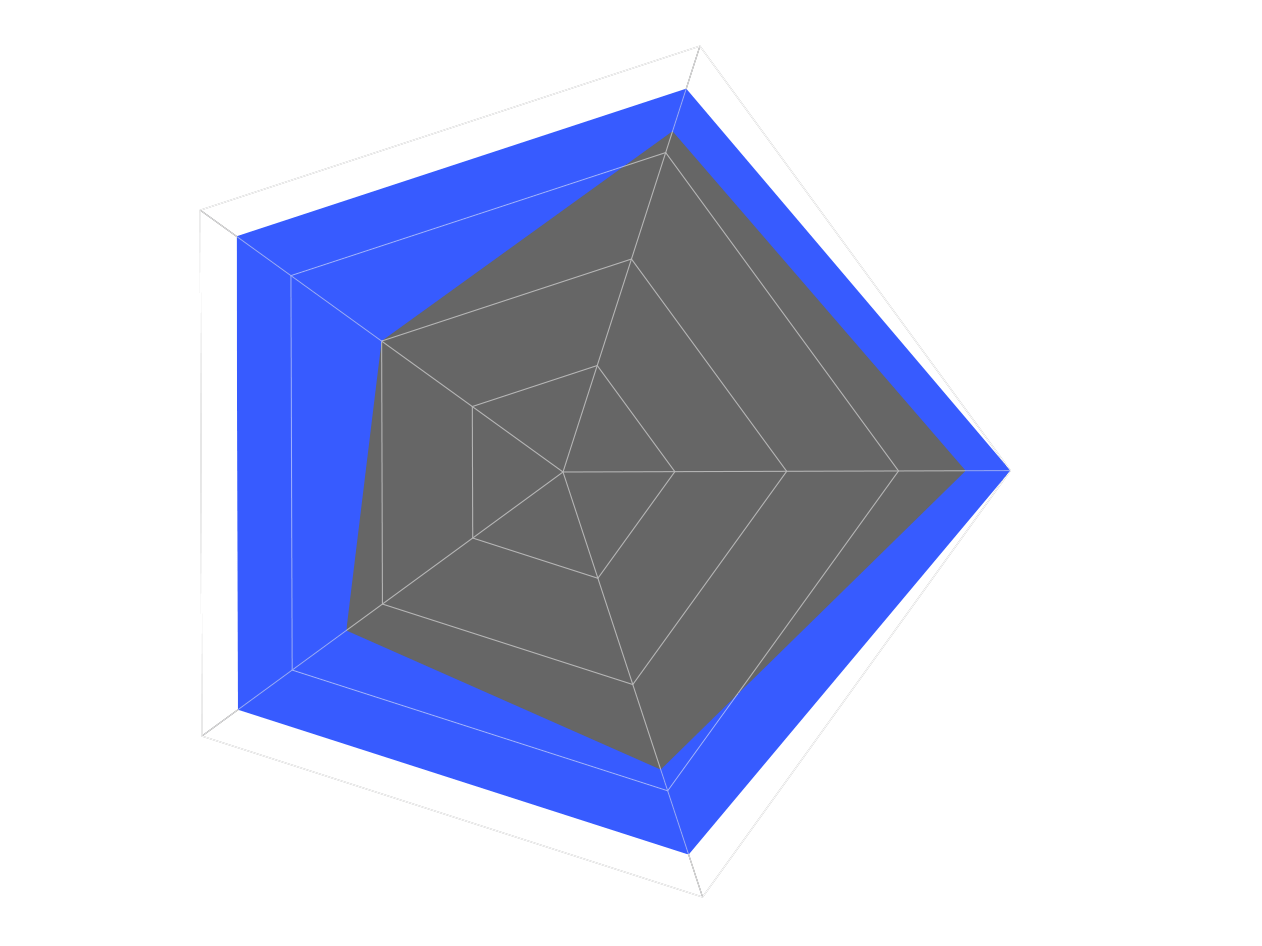
Collaboration
Communication + Sharing
Wikimee offers real-time communication through feeds in tasks, projects, workspaces and portals, brought together in a central dashboard, so teams collaborate in an integrated way.
Real-time comments within documents and tasks, but without communication as robust as Wikimee's.
Drive
Approval + Publishing + Distribution
Native DAM: organization, storage, approval, publishing and sharing of assets, end to end.
No native DAM. Files can be attached to documents, but without an advanced organization structure.
Organization
Hierarchy + Segmentation
Hierarchy of Accounts, Subaccounts and Workspaces with segmentation by profile, automating access and permissions.
It allows the creation of workspaces, but without a hierarchical organization.
Operation
Demand + Project + Campaign Management
Management of demands, projects and campaigns with schedules, boards and automated workflows.
Kanban boards, task lists, schedules and databases: very flexible for projects, but weak on process.
Engagement
People + Teams + Clients
Relationship portals that centralize and distribute content to clients and employees.
It shares pages and documents via public or private links. No branded client portals.
Why choose Wikimee?
See the main differences between Wikimee and Notion
 vs
vsPros, cons and customer service
From the very first week you can see results with the Wikimee Experience Platform. With it, you can put into practice many of the changes your business and marketing evolution demand.
Integrated management
A complete solution for creative operations, including project management, digital assets and workflow automation.
Organization
An Accounts > Subaccounts > Workspaces hierarchy, enabling granular control and autonomy for different teams and personas.
Personalized portals
Easier access, centralized information and communication with clients or specific operations.
Intuitive management
A control panel with quick views and different perspectives of everything around you.
Integrated Drive
A native digital asset management solution, with content approval and publishing.
Learning curve
Eased by personalized onboarding and customer success in your language for the management team.
Flexibility
Highly customizable, allowing the creation of workspaces, pages and databases.
Intuitive interface
Easy to use and adapt to the team's needs.
Full documentation
Ideal for internal documentation, notes and project planning.
Real-time collaboration
Collaborative editing and comments in real time.
Integrations
Availability of integrations in constant expansion or on demand.
No DAM
It does not have a native digital asset management system.
Limited hierarchy
No sub-accounts or advanced hierarchical structure.
Limited communication
No robust integrated communication system.
Support
Wikimee offers different levels of customer support depending on your plan. Support is personalized and responds quickly. Cases are recorded in the CRM and build each user's knowledge base.
Help Center
A contextualized knowledge base with ticket opening and messaging.
PoC - Proof of Concept
A free test environment lets the company explore every feature before signing a corporate plan.
Personalized onboarding
Adapted to the specific needs of each client to ensure a successful implementation.
Tutorials and getting started
Navigational tutorials to understand each platform component and to administer the account.
Success Manager
A dedicated professional who accompanies the client throughout the use of the platform, helping achieve better results.
Account Manager
An agent available for new challenges and business opportunities, with dedicated service.
Support
Notion offers customer support depending on the plan. Response times may vary by plan level.
Help Center
A contextualized knowledge base with ticket opening and messaging.
Community
A user community you can consult for questions and practical solutions.
Tutorials and videos
A series of tutorials and videos with tours and help getting started with the tool.
Final considerations
The choice between the Wikimee Platform and Notion depends on the specific needs of your organization.
If you want a modern, complete solution for creative operations, including project management, DAM, personalized portals and workflow automation, Wikimee is the best option. Its hierarchical customization and direct relationship with clients are important differentiators.
On the other hand, if the priority is a tool for internal documentation and organization, Notion could be a good choice. It is more focused on notes and databases, however, and may not meet the demands of companies that need advanced digital asset management, complex projects or solid demand management.
Not ready to give up Notion yet?
If you love Notion or can't give it up in the short term, that's fine! Wikimee and Notion can integrate, bringing together the best of organization with the best of operations. Try it for free or talk to one of our experts (also free).